XPath Support
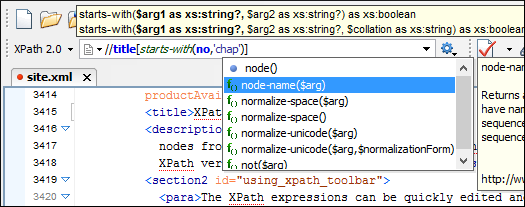
The XPath expressions can be quickly edited and executed using the XPath toolbar. The content completion support shows documentation for XPath 1.0, 2.0, and 3.0 functions. A function signature tooltip, presented in a message box above the current function, indicates the names and types of the edited arguments.
XPath Builder View
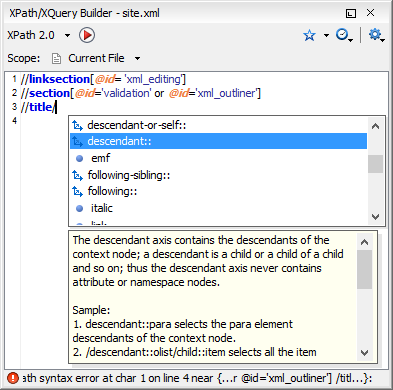
This view allows you to edit multi-line, complex expressions and assists you with features such as the Content Completion Assistant, syntax highlight, automatic validation, and documentation of the currently edited item. The executed expressions are stored in a history list and they can be re-used as necessary from the Content Completion Assistant.
XPath Scope
XPath expressions can be executed over multiple files. You can choose one of the predefined scopes (current file, entire project, a selection from the project, all open files, DITA Map hierarchy) or define your own collection of files (a working set). Scope selection is available in both the XPath/XQuery Builder view and in the XPath toolbar.
You can choose to execute XPath expressions over all XML files from the selected scope but you can also define patterns to filter out certain files.
Presentation of the XPath Results
The results of an XPath query are shown as a list in the results panel. You can save the results to a file, by clicking the Save Results option from the contextual menu, and you can also print the XPath results. Clicking on a line in the results panel highlights the corresponding part from the document.
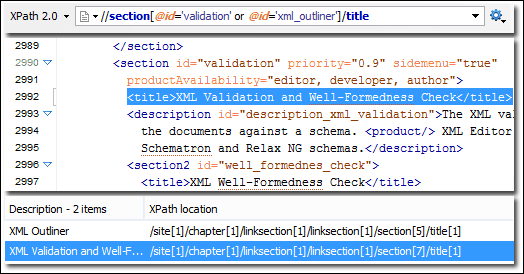
Results are returned in a format that is a valid XPath expression: [FileName.xml] /node[value]/node[value]/node[value]
If your project is comprised of a main file with ENTITY references to other files, you can use XPath to return all the elements matching a certain criteria by querying the main file. The results list includes results from all referenced files, providing a simple way to access the nodes of the document.