XML Validation and Well-Formedness Check
XML Well-Formedness Check
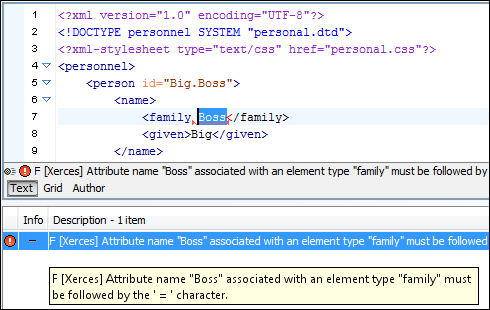
A "Well-Formed" XML document means that it has a correct XML syntax. The Check Well-Formedness action checks that your document conforms to the XML syntax rules.
Validate Documents
A valid XML document is "Well-Formed", and also conforms to the rules of a Document Type Definition (DTD) , XML Schema, or other type of schema that defines the structure of an XML document.
When creating XML documents, errors can be introduced. Working with large projects or a vast number of files increases the probability that errors will occur. Identifying and resolving errors in your project can be time consuming and frustrating. Fortunately, Oxygen provides functions that make error identification fast and easy.
Validate XML Documents Against W3C XML Schemas
Oxygen integrates the latest version of the Xerces-J XML parser to validate documents against XML Schemas. Xerces is widely considered the best open-source XML parser and is used in many enterprise servers.
Validation Scenarios
The Oxygen Validation Scenarios are very powerful and solve numerous important issues when working with XML markup and XML-related technologies. They also allow you to work with modules and perform multiple validations with one action.
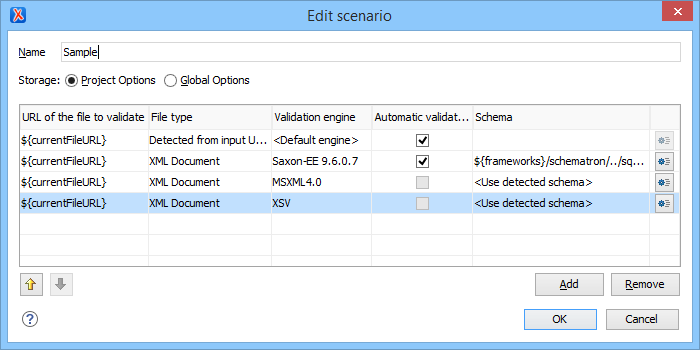
By default, the validation of a document is done by using a processor (XML parser, XSLT transformer, XQuery engine, etc.) to analyze the current file. The validation scenario allows you to specify a set of files to validate, the processor to use for each file, and whether or not to perform continuous validation. When working with a module, you can perform the validation on the Main File (the file that references that module) and you can also perform multiple validations on various files or with various processors.
Working with Modules
Suppose that you are working with a large XML document that you decide to split into multiple files and use external entities to merge those files into a main document. If you edit one of those files then you would want to check that the main document is valid. Oxygen Validation Scenarios allow you to validate the main document instead of only validating the current file. Thus, the current file is validated in the context of its Main File.
XSLT stylesheets, as is the case with many other XML-related technologies (XQuery, Relax NG, etc.), can be invalid by themselves, yet valid in the context of being imported or included in other files. For instance, you can have an XSLT stylesheet that makes a reference to a named template or variable that is not defined in the current file, but it is defined in the Main File that includes the XSLT stylesheet. In this case, if you validate the XSLT module by itself, you will get an error that no template or variable exists with that name. However, you can use custom validation scenarios in Oxygen to validate the main XSLT stylesheet that includes this module and there will be no such error.
Multiple Validations in One Action
Some XML technologies are complicated, as is the case with XML Schema or XSLT processors. When you edit documents that are intended to be public or should work no matter what engine is used, it is best to check them against all engines they will be used with. The Oxygen Validation Scenarios allow you to specify multiple validations to be performed and which engine to use for each validation. For example, when editing a schema, there are 6 XML Schema processors that Oxygen supports and others can also be added as external processors. Oxygen validates your schema against all of the processors in one action. Therefore, you can easily check to see that your schema will work no matter what processor is used.
Suppose that you have a set of XML instance documents and you want to change their schema while ensuring that they are still valid. The Oxygen Validation Scenarios allow you to configure multiple validations (on each instance document and on the schema file) and is performed in a single action. This allows you to make sure that the schema is valid and your instance documents are valid against the updated schema.
Working with Modules and Multiple Validation
When you work with modules, it is also common to re-use them in various contexts (main files). Oxygen allows you to validate a module in all the contexts from which it is used since the validation scenarios allow you to set multiple files for validation. Therefore, you can specify all the main files that use the module, and in a single action, check that the module is valid in all its contexts.
Continuous Validation
Oxygen can be configured to continuously report validation errors in an edited document as you modify it. By selecting the Enable automatic validation option, validation errors will automatically be displayed as you type, after a configurable delay.
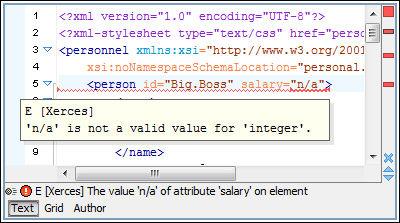
At the bottom of the editing area, a message is displayed that describes the error that is closest to the cursor position.
Error Markers and Overview Ruler
The location of errors, including those that are generated by continuous validation, are marked in-place with an underline. The error locations are also marked in red on the right side of the editing view, in an overview ruler that allows you to quickly navigate between the errors.
Multiple External Validation Engines
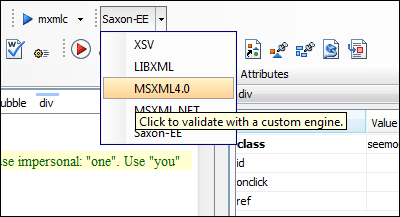
Oxygen has built-in support for various external validation engines, including Xerces, LIBXML, XSV, Saxon SA, MSXML4.0, MSXML .NET and SQC.
In addition to these engines that are pre-configured, you can also add your own custom validation engine.
Schematron Support
Oxygen can validate XML documents using Schematron schemas, XML Schemas, or Relax NG schemas that contain embedded Schematron rules. Editing and validation support is also included for Schematron schemas.
For validation, Oxygen uses the Skeleton XSLT processor that is Schematron 1.5 compliant.
For schemas that define various validation phases, Oxygen automatically shows a dialog box where the validation phase can be selected.
Oxygen also includes support for Schematron Quick Fixes and ISO Schematron.
Schematron Quick Fixes
Schematron Quick Fixes (SQF) help you resolve errors that appear in XML documents that are validated against Schematron schemas by offering you solution proposals. The Schematron Quick Fixes are an extension of the Schematron language and they allow you to define fixes for Schematron error messages. You can customize Schematron Quick Fixes by editing them directly in a Schematron file or in a separate file.
Editing ISO Schematron Schemas
Oxygen has a Schematron editor that analyzes the namespace and automatically detects if the edited Schematron schema is ISO Schematron. It offers continuous validation as well as a Content Completion Assistant with suggestions for the ISO Schematron elements, attributes, and values.
Editing Support for Embedded ISO Schematron Rules in XML Schema
When editing XML Schemas, Oxygen offers proposals, using the Content Completion Assistant, inside xs:annotation and xs:appinfo ISO Schematron. This makes Schematron embedded rules easier to edit.
Validating XML Documents Against ISO Schematron
Oxygen supports validation against ISO Schematron schemas, including validation on request, continuous validation, and batch validation.
Validating XML Document Against ISO Schematron Embedded Rules
ISO Schematron rules can be embedded in other schemas. Oxygen offers validation against ISO Schematron rules embedded in Relax NG schemas or XML Schema.
Support for Abstract Patterns and Included ISO Schematron Schemas
Oxygen also supports ISO Schematron schemas that contain abstract patterns or references to other ISO Schematron files through sch:include.
Schematron Diagnostics and Reports
The diagnostics messages reported by Schematron schema are displayed along with other validation errors. Schematron report messages are displayed as warnings.
Option for Using Saxon EE (Schema Aware) for Schematron
XPath 2.0 checks, used in an ISO Schematron schema or Schematron 1.5 schema, can optionally be executed with Saxon EE, instead of Saxon B, in order to access the schema-aware features of Saxon EE. The Saxon EE processor is an extension of the Saxon B processor and is bundled with the Oxygen software packages.
XML Catalog Support
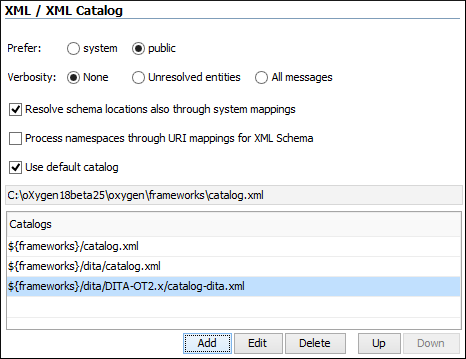
An XML Catalog defines mappings between schema locations and local copies of the schema documents. For example, default DocBook documents use the DTDs that are located on the Oasis website. This means that each validation will take time since the DTDs need to be downloaded each time. To speed up this process, Oxygen uses several catalogs for its default frameworks that are set up automatically the first time you run the application.
The catalog list can be managed from the XML Catalog preferences page, as seen below.
Validate with XML Schema While Allowing External Entities
The lack of support for external entities is a known weakness of XML Schema. There are documents that reference a schema but also contain a DTD declaration that allows external entities to be defined. Oxygen allows XML schema and external entities to co-exist since you can configure the validation to be performed against the specified XML schema even if a DTD is also specified.
Validate XML Documents Against DTDs
You can use Oxygen to validate an XML document instance against a specified DTD.
Validate XML Documents Against Relax NG Schema
With Oxygen, you can easily validate documents against Relax NG (in both XML syntax and compact syntax) and Namespace Routing Language (NRL) schemas.
Extended Batch Validation
Multiple files that are currently selected in the Project view can be validated against a schema file with a single action from the toolbar or contextual menu. The supported schemas include XML Schema, Relax NG, NVDL, Schematron, or XML Schema/Relax NG schema with embedded Schematron rules. This makes it easy to group the files in your project and validate them as a batch.
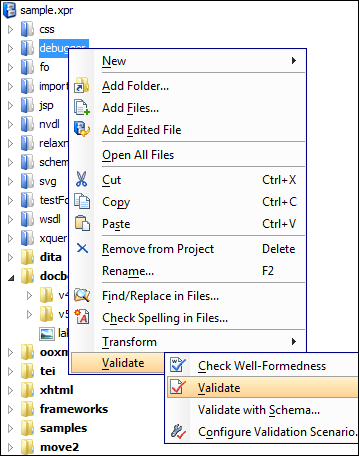
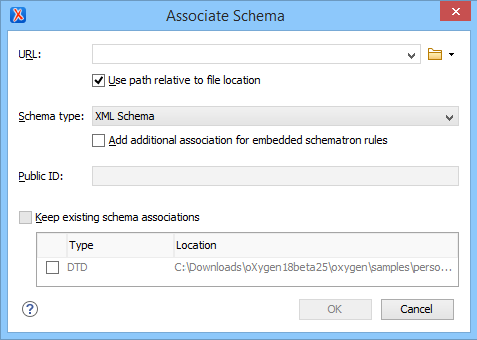
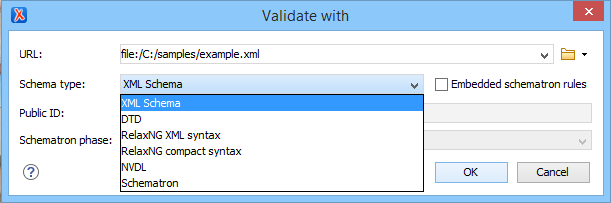
The following image shows the dialog box for choosing a validation schema.
Error Reporting and Error Tracking
Errors are reported in an informational pane, indicating the severity of the problem, location information (line number, file path), and a descriptive message. You can track document errors by simply double-clicking the error in the Errors pane. The editor opens the corresponding file and jump to and highlights the location of the error.