Helper Views
Model View
The Model view presents the structure of the currently edited element, as well as additional element documentation.
Schemas have been annotated for XSLT stylesheets, XML Schemas, DocBook, Formatting Objects, and others, so that you can immediately benefit from the additional information about the elements. If you are learning XSLT, or you are not sure about the meaning of an element or attribute, you can simply select it and read the description.
The Model view is a useful tool for providing you with insightful information about the current node and the structure of the edited document.
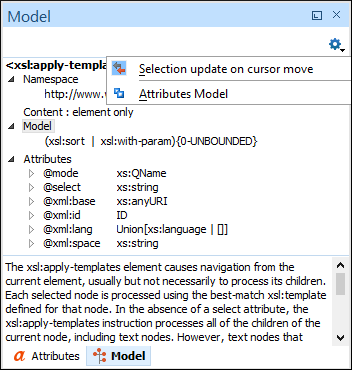
The information displayed includes the name, model, and attributes of the currently edited XML element. The available attributes are shown, along with any restrictions they might possess.
The pane at the bottom of the Model view shows useful annotations for the currently selected element. This support has been extended to documents that include DTDs. If an element declaration includes comments, they are shown in the Model view. The annotation information is also displayed as a tooltip when moving the mouse pointer over an element in the editor panel.
Elements View
The Elements view shows the XML elements, defined by the schema, that can be inserted at the current position within the document.
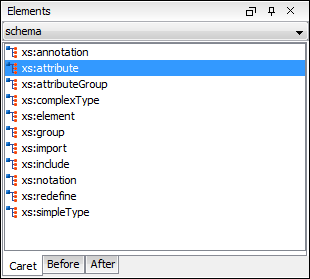
You can insert an element by simply clicking on it.
When editing in the Author visual editing mode, you can add elements before or after the element where the cursor is located.
Entities View
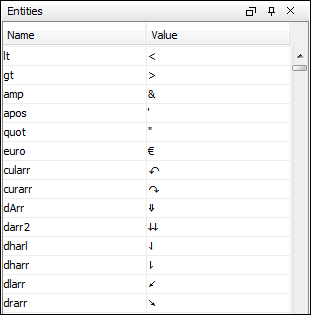
The Entities view shows all the defined XML entities that are available for your document. You can insert an entity at the current position by clicking on its name and the resulting output displays the entity that is shown in the Value column.
CSS Inspector View
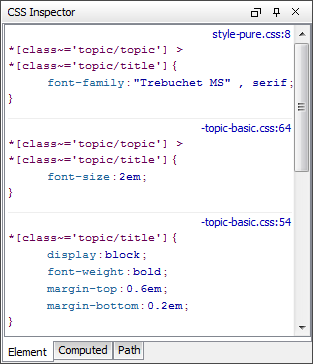
The purpose of the CSS Inspector view is to display information about the styles applied to the currently selected element in the Author mode. You can use this view to examine the CSS rules that match the element. The matching rules displayed in this view also include a link that opens the associated CSS file at the line number where the properties of the rule are defined for editing purposes.