Visual - WYSIWYG DocBook Editor
DocBook Documents Support
<oXygen/> comes with DocBook DTDs, XML catalog, XSL stylesheets and
document templates so that one can start creating DocBook documents
right away. The articles from our site are written using DocBook and
their sources are available for download. You can use them as samples to
start with! DocBook documents can be converted to HTML, PDF or
PostScript and supports intelligent XML editing, validation, content
completion.
Specific DocBook Actions
<oXygen/> is able to recognize the DocBook documents based either on
the root element name or namespace. When you switch to the
Author mode, the editor loads both the set of CSS
files and the available actions that were associated in the DocBook
configuration.
The action set include operations for emphasising text, creating
lists, tables, sections and paragraphs.
More than this, you can create your own operations for inserting or
deleting XML document fragments.
Table Support: CALS and HTML Table Model
You can create CALS or HTML tables, join or split cells, add or remove
rows easily. <oXygen/> will create all the column specifications for
you.
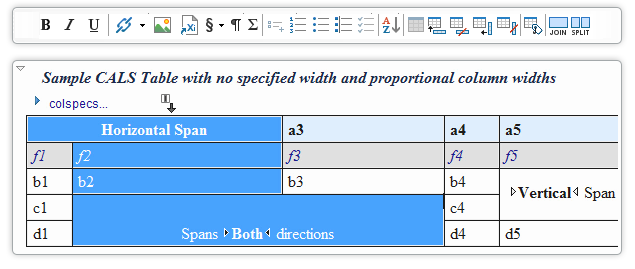
A CALS table example. The caret is positioned between two
cells.
<oXygen/>can manage table width and column width specifications from
the source document both in fixed and proportional dimensions. The
tables and columns widths can be visually adjusted by dragging with the
mouse their edges.
A HTML table example. The column widths are adjusted.
XML Source Editing
You can edit the DocBook files using the text/source editing mode of
<oXygen/> XML Editor. The "as you type" validation and the powerful
content completion are always on your side.
DocBook with XInclude Support
A new module file was added in the DocBook DTD distribution adding
XInclude support to the DocBook DTD. There are also document templates
(New from templates action) that allows easy creation of a DocBook
document with XInclude support. An XInclude sample is provided.
DocBook Catalog
<oXygen/> adds by default a root catalog that refers the built-in
catalogs for DocBook documents. These are located in the
frameworks/docbook subdirectory of the installation.
Transforming DocBook documents to PDF
Before transforming the current edited XML document in <oXygen/> one
must define a transformation scenario to apply to that document. A
scenario is a set of values for various parameters defining a
transformation.
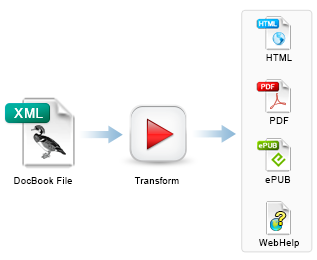
<oXygen/> has two predefined scenarios for DocBook, one using the XSLs
for FO-PDF output and the other using the stylesheets for HTML. These
scenarios can be reused for any DocBook document. If the predefined
settings are not exactly what you need you can easily change them.
The Apache FOP is bundled inside <oXygen/> and it does not require
any special configuration. Thus you can convert DocBook to PDF just by
selecting a scenario and pressing a button.
Visual Content Change Tracking
Change Tracking is a way to keep a history of the
changes made to a document. When change tracking is enabled the inserted and
deleted content is highlighted in the document allowing to easily identify
the affected regions.
Multiple authors support
<oXygen/> supports changes from multiple authors,
rendering each author changes with different colors.
For each change oXygen stores the author and the
date when that change was performed. The name of the author who is
currently making changes and the colors can be customized from the
Track Changes preferences page.
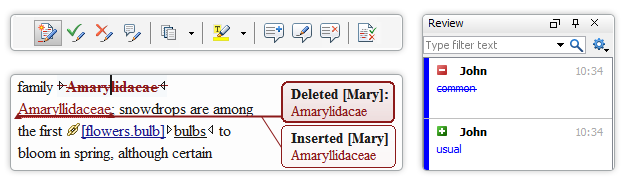
In the above screenshot you can see how various
insert/delete changes made by various authors are displayed. The tooltip
shows information about the change.
Change management
You can review the changes made by you or other
authors and then accept or reject them using the Track Changes toolbar
buttons or by using the change management dialog.
Always Up to Date!
Each <oXygen/> XML Editor release bundles the latest DocBook schemas
and XSL stylesheets. At this time, both DocBook 4 and DocBook5 are
included.
|