• 2027

    28.1.0
    Version 28.1.0 - March 18, 2026
  • 2026

    28.0.0
    Version 28.0.0 - November 26, 2025
  • 27.1.0
    Version 27.1.0 - March 24, 2025
  • 2025

    27.0.0
    Version 27.0.0 - November 27, 2024
  • 26.1.0
    Version 26.1.0 - March 25, 2024
  • 2024

    26.0.0
    Version 26.0.0 - October 11, 2023
  • 25.1.0
    Version 25.1.0 - March 16, 2023
  • 2023

    25.0.0
    Version 25.0.0 - October 13, 2022
  • 24.1.0
    Version 24.1.0 - March 7, 2022
  • 2022

    24.0.0
    Version 24.0.0 - October 18, 2021
  • 23.1.1
    Version 23.1.1 - July 12, 2021
  • 23.1.0
    Version 23.1.0 - March 4, 2021
  • 2021

    23.0.0
    Version 23.0.0 - November 19, 2020
  • 22.1.0
    Version 22.1.0 - May 19, 2020
  • 22.0.0
    Version 22.0.0 - February 12, 2020
  • 2020

    21.1.1
    Version 21.1.1 - October 24, 2019
  • 21.1.0
    Version 21.1.0 - May 23, 2019
  • 21.0.0
    Version 21.0.0 - February 22, 2019
  • 2019

    20.1.0
    Version 20.1.0 - June 15, 2018
  • 20.0.0
    Version 20.0.0 - March 16, 2018
  • 2018

  • 19.0.0
    Version 19.1.0 - September 29, 2017
    Version 19.0.0 - April 5, 2017
  • 2017

  • 18.0.0
    Version 18.1.0 - October 18, 2016
    Version 18.0.1 - August 9, 2016
    Version 18.0.0 - April 21, 2016
    Version 18.0 - April 21, 2016
  • 18.0
    Version 18.1.0 - October 18, 2016
    Version 18.0.1 - August 9, 2016
    Version 18.0.0 - April 21, 2016
    Version 18.0 - April 21, 2016

What's New in Oxygen XML Web Author 28.1.0

March 18, 2026

Oxygen XML Web Author 28.1.0 focuses on introducing significant advancements in AI-powered authoring through the new Planner chat mode in Oxygen AI Positron, enhanced editing capabilities including DITA improvements, expanded customization options, and improved table editing across multiple formats. This release also adds the ability to work with S1000D® issue 4.x content.

There are changes in:

Oxygen AI Positron for Web Author

Oxygen XML Web Author 28.1.0 is compatible with the enhanced Oxygen AI Positron for Web Author version 8.1 which introduces the following AI additions:

Optimized Token Consumption for AI Prompts and Tools

The prompts and tools that the AI uses to generate answers have been improved to consume fewer tokens/credits.

New Planner Chat Mode for Resource Consuming Tasks

The newly-introduced Planner chat mode is available for complex, token-intensive operations (e.g. “Translate all files in the current folder” or “Find all conrefs and replace them with conkeyrefs in userguide.ditamap”).

After being given the prompt, the AI explores your project, proposes a multi-step plan, and, after your approval, delegates each step to the most suitable AI agent. This means large, project-wide changes can be coordinated without hitting LLM context limits, while still showing you the tool calls and results for review.

More Context Information Available in Chat

The AI chat now automatically includes additional information about your environment and editing context, such as the Oxygen application version, current date, and caret or selection data. Having richer contextual information leads to higher-quality AI responses.

Documentation and APIs to Create New Chat Modes

You can now officially define new chat modes by creating new AI actions that contain the "output-action": "agentic" property.

Tools to List and Invoke AI Agents

Newly added tools make it possible to create powerful new chat modes to plan complex changes and then use separate agents for each part of the plan. For more details, see AI Positron User Guide: Tools to Invoke AI Actions or Agents.

Control AI Action Visibility

You can now choose whether a defined AI action is visible in the UI or only available to other AI actions as a sub-agent by using the new visibility property. For more details, see AI Positron User Guide: Visibility Property.

Create AI Actions with Vision Support

You can control whether a custom-defined AI action sends both content and referenced images to the LLM by using the "input-type": "markup-with-images" JSON property.

Generate Image Alternate Text Improvements

The Generate Image Alternate Text action can now be used on all images that are referenced within a document at once, while you can still use the action on individual selections as well.

Preserve Structure and Styles for Attached Word and PDF Documents

When attaching Word (.docx) or PDF documents in the chat, their internal structure (headings, lists, tables, code blocks) and styling (bold, italic) are now preserved when being sent to the AI so that it better understands the context of the document.

General Editing/Reviewing

Apply Colors and Styles for Profiled Content using DITAVAL Flagging
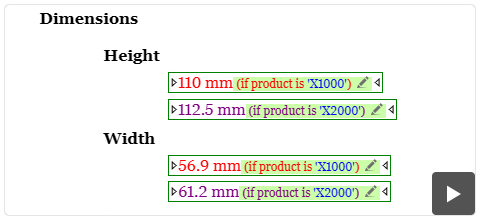
You can now easily distinguish profiled content by applying colors and text styles using DITAVAL flagging. These styles are rendered directly in the visual editor and DITA Map pane according to your active DITAVAL file. For more information about using a DITAVAL filter file in Web Author to control the filtering or flagging of profiled content, see Filtering Profiling Values with a DITAVAL File.

Work with Large DITA Tables Using Sticky Headers
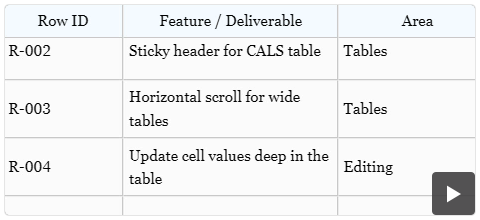
You can now keep table headers visible while you scroll large DITA tables. Tables with many rows use an internal scrollbar so you can navigate long tables without losing context.

Insert Multiple Rows or Columns in Tables
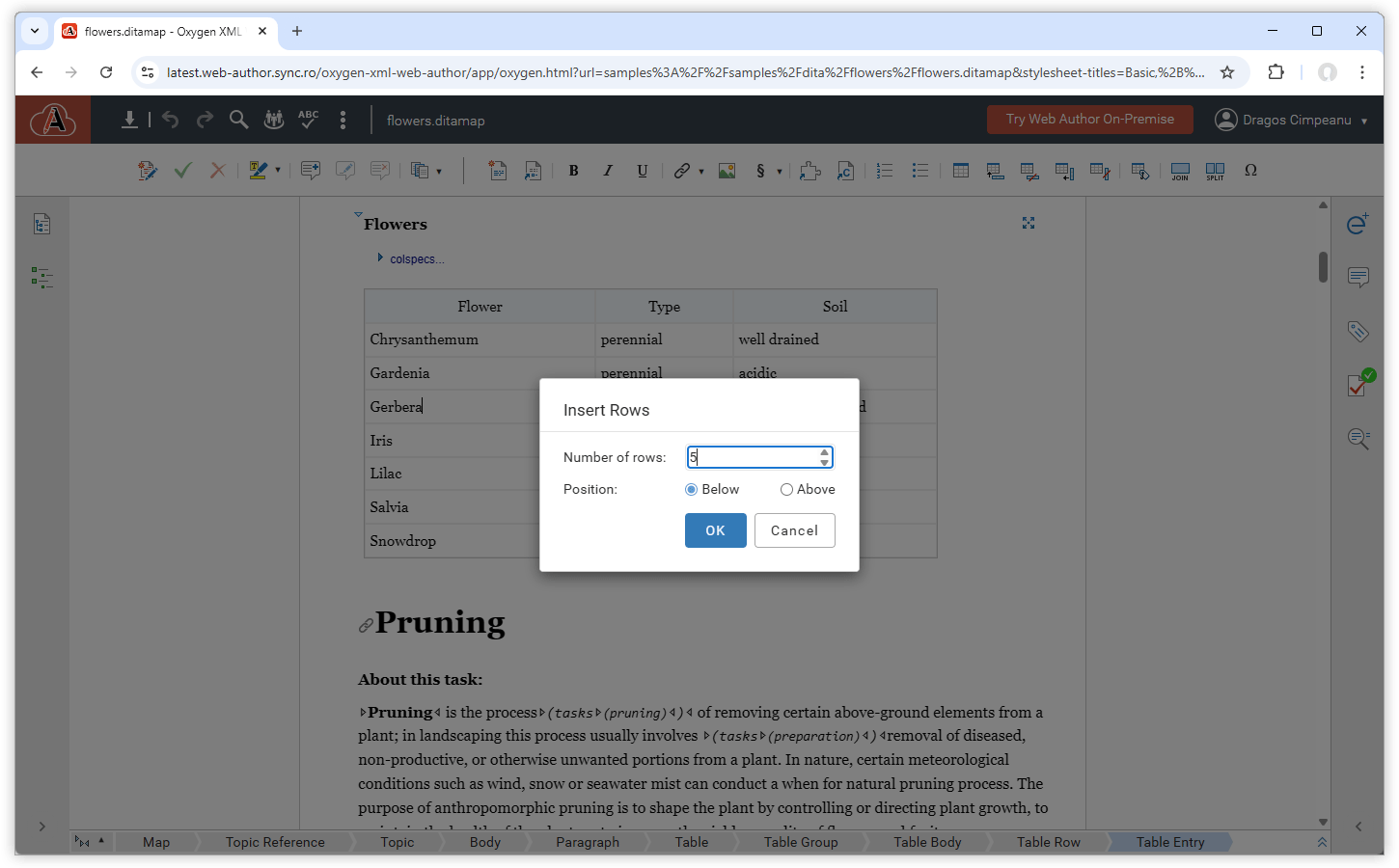
You can now insert multiple empty rows or columns at once in tables from DITA, DocBook, XHTML, and TEI documents. New Insert Rows and Insert Columns actions are available in the table contextual menu, allowing you to choose how many rows or columns to insert and whether to place them before or after the current selection.
Insert Multiple Rows or Columns in Tables

Context-Based File Browsing Filter

The file browser now filters available files based on your current task. When you insert images, maps, DITAVAL files, or other assets, you see only file types that are valid for that action. This helps you find the right files faster and avoid selecting incompatible resources during authoring.
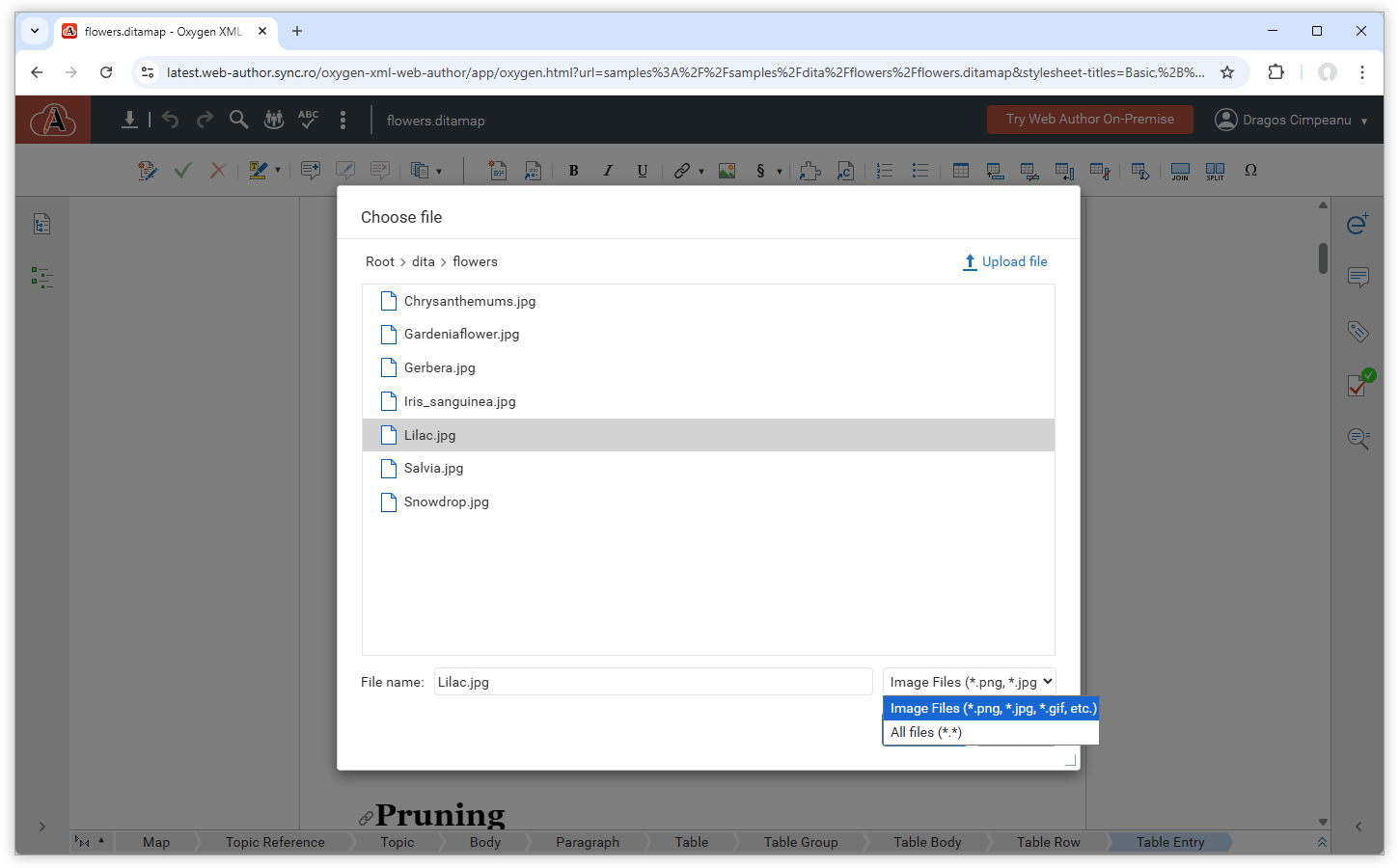
Context-Based File Browsing Filter

S1000D

You can now work with S1000D issue 4.x content using built-in support for editing and visual authoring, including templates, and Smart Paste.

Editing and Validation

Edit S1000D documents with schema-guided editing, validation, and content completion support.
Editing and Validation

Visual Editing and Actions

Visually edit S1000D documents in the Author visual editing mode and switch between full-width, print preview, or large-font styles. Use dedicated actions to insert and edit tables, lists, and text styling.

New File Templates

Create new S1000D data or publication modules for issues 4.0, 4.1, and 4.2 using the provided new file templates.

Documentation for S1000D Elements and Attributes

View documentation for S1000D elements and attributes directly in the content completion window and in the Attributes view.

Smart Paste for S1000D Documents

Paste content from web browsers or Word documents into S1000D documents while preserving the structure and formatting.

Customization and Integration

Custom Mention Suggestions and Notifications

You can now provide custom user suggestions for @ mentions in review comments using the sync.api.author.UserMentionProposalsProvider API. This helps reviewers quickly find and mention the right collaborators. You can combine this with the sync.api.author.ReviewCommentHook API to detect when comments containing mentions are added and notify the mentioned users. For more details, see the User Mentions API tutorial.

When you mention a collaborator in a review comment, a drop-down list displays the available users to make it very easy to select the particular collaborator. By default, the list shows all authors from the current document.

Easily Select Collaborators to Mention in Review Comments

Intercept and Validate Review Comments

You can now intercept and validate review comments, added or edited, by using the sync.api.author.ReviewCommentHook API. This lets you enforce rules such as allowing @ mentions only for users who are part of the review team. For details, see the Review Comment Hook API tutorial.

Customize File Browser Filters

You can use the File Browser Descriptor API to customize which file types appear in the Web Author file browser and upload dialog boxes. For example, you can define a filter that only shows SVG files when selecting images. For more details, see Web Author Customization Guide: File Browser Descriptor API.

Control UI Font Family via API

You can use the new workspace.setBaseFontFamily(fontFamily) API to set a custom font family for all views and dialog boxes in Web Author, so you can align the interface with your branding or readability requirements.