
Organization Security Page
Organization administrators can use the Security page to configure trusted hosts for editing and publishing connections.
The Security page in Oxygen Content Fusion allows organization administrators to configure trusted hosts for editing and publishing connections.
Accessing the Security Page
Only users with an Organization Administrator role can access the security
management page. To access this page:
- Click on your user profile name in the top-right corner of the interface.
- Select Manage organization from the drop-down menu.
- In the organization management interface, click on Security in the left navigation panel.
Note:
If you do not see the Manage organization
option in your user menu, you do not have administrator privileges for your
organization.
Page Layout and Components
The Security page provides a way to configure trusted hosts from which resources can be retrieved.
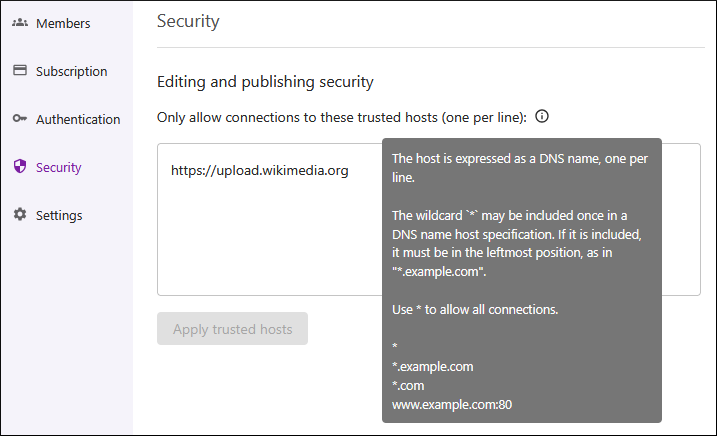
The Security page includes the following option:
- Only allow connections to these trusted hosts (one per line)
- Administrators can specify a list of DNS names (one per line) that will be trusted and resources can be loaded from the specified hosts. The * wildcard can be used, but only at the beginning of the line.