
My Review Tasks Page
How to use the My Review Tasks page to find, filter, and open review tasks.
When you navigate to Review Tasks, the My Review Tasks page opens in the main area. It shows tasks that you own and tasks assigned to you.
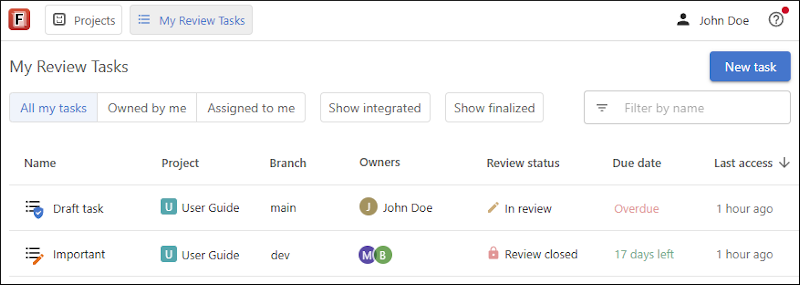
Filters and Task List
The page includes filters that help you focus on the tasks you need.
- All my tasks shows all tasks that you own and all tasks that are assigned to you.
- Owned By Me shows only the tasks where you are an owner.
- Assigned To Me shows only the tasks that are assigned to you for review.
When tasks that you own are visible, you can click Show integrated(if not enabled) to include integrated tasks in the list. Click the same control again to hide them.
When the tasks assigned to you are visible, you can click Show finalized (if not enabled) to include tasks that you already finalized.
You can use the Filter by name field to filter the list of review tasks and find a specific task more quickly.
The task list includes columns for the task (Name, Project and Branch for project review tasks, Owners, Review Status, Due Date when one is configured on the Task Settings page, and Last Access).
You can sort the task list by clicking a column header. An arrow next to the header shows which column is used for sorting and whether the sort order is ascending or descending.
To open a task, click it in the list. This opens the Task Dashboard page.
The task review status is displayed in the list. For more information, see Review Task Status.
Task Actions for Owners
For tasks you own, you can hover over a task to display an actions menu on the far-right side. This menu includes the following actions:
- Delete - Deletes the review task.
- Mark as integrated - Available when an independent review task has the Review closed status. This changes the task to the Integrated status, archives the task, removes it from the default task lists, and makes it visible only to task owners when they activate the Show integrated filter.
For more information about actions that are available in an open task, see Review Task Header.