
Compare Files
Attention:
This script is
bundled with the all platforms distribution of Oxygen XML Editor. To run the script, you are required to purchase a special scripting commercial license.
The Compare Files script
(compareFiles.sh/compareFiles.bat, found in the
scripts subfolder inside Oxygen's installation directory) can be
used to compare files and get the comparison results in various formats.
Arguments for the Compare Files Script
There are 2 ways that the script's arguments/options can be retrieved (with slightly different command-line syntax), depending on whether or not a configuration file is specified for retrieving the arguments.
Syntax 1 (Using the Command Line to Specify Arguments)
sh scripts/compareFiles.sh firstFilePath secondFilePath [[baseFilePath] [-ct contentType] [-alg comparisonAlg] [-als algStrength] [-iws ignoreWS] [-ipi ignorePI] [-icm ignoreComments] [-icd ignoreCDATA] [-idt ignoreDocType] [-itn ignoreText] [-ins ignoreNS] [-ind ignoreNSDecl] [-inp ignorePrefixes] [-iao ignoreAttrOrder] [-iee ignoreExpStateForEmptyElems] [-enx XPathExprToExcludeNodes] [-out outputFormat]] [-help | --help | -h | --h]- firstFilePath
- Mandatory argument that specifies the first file path (it can also be provided as a URL).
- secondFilePath
- Mandatory argument that specifies the second file path (it can also be provided as a URL).
- baseFilePath
- Optional argument that specifies the path of the base file that the other two files will be compared against in a 3-way comparison (it can also be provided as a URL).
Syntax 2 (Using a Configuration File to Provide Arguments)
sh scripts/compareFiles.sh -argsFile argsFilePath [[-fp firstFilePath] [-sp secondFilePath] [-bp baseFilePath] [-ct contentType] [-alg comparisonAlg] [-als algStrength] [-iws ignoreWS] [-ipi ignorePI] [-icm ignoreComments] [-icd ignoreCDATA] [-idt ignoreDocType] [-itn ignoreText] [-ins ignoreNS] [-ind ignoreNSDecl] [-inp ignorePrefixes] [-iao ignoreAttrOrder] [-iee ignoreExpStateForEmptyElems] [-enx XPathExprToExcludeNodes] [-out outputFormat] [-outfile outputFile] [-merge mergeOperation] [-mergeout outputDirPathForMerge]] [-help | --help | -h | --h]- -argsFile argsFilePath
- Mandatory argument (it must be the first one provided) that specifies the path of the file to retrieve the script arguments from. The file path can also be provided as a URL.
- -fp firstFilePath
- Optional argument that specifies the first file path (it can also be provided as a URL).
- -sp secondFilePath
- Optional argument that specifies the second file path (it can also be provided as a URL).
- -bp baseFilePath
- Optional argument that specifies the path of the base file that the other two files will be compared against in a 3-way comparison (it can also be provided as a URL).
Common Arguments for Both Syntaxes
- -ct contentType
- Specifies the content type of the files to be compared. Possible values (based on known extensions of some of the most common file types): .xml, .dtd, .css, .rnc, .xquery, .json, .yaml, .java, .js, .c, .cpp, .pl, .py, .php, .sql, .bat, .sh, .properties, .txt. The option is used to force the file handling to the specific type of file. Otherwise, the file extension is auto-detected.
- -alg comparisonAlg
- Specifies the algorithm to be used for the comparison. Possible values: auto, chars, words, lines, syntax_aware, xml_fast, and xml_accurate. Default value = auto.
- -als algStrength
- Specifies the strength of the algorithm to be used for the comparison. Possible values: low, medium, high, and very_high. Default value = medium.
- -iws ignoreWS
- If set to true, whitespaces are ignored if differences consist only of whitespaces. Default value = false.
- -ipi ignorePI (only for the XML-aware algorithms)
- If set to true, processing instructions are ignored in the comparison. Default value = false.
- -icm ignoreComments (only for the XML-aware algorithms)
- If set to true, comments are ignored in the comparison. Default value = false.
- -idt ignoreDocType (only for the XML-aware algorithms)
- If set to true, DOCTYPE sections are ignored in the comparison. Default value = false.
- -itn ignoreText (only for the XML-aware algorithms)
- If set to true, text content is ignored in the comparison. Default value = false.
- -ins ignoreNS (only for the XML-aware algorithms)
- If set to true, namespaces are ignored in the comparison. Default value = false.
- -ind ignoreNSDecl (only for the XML-aware algorithms)
- If set to true, namespace declarations are ignored in the comparison. Default value = false.
- -inp ignorePrefixes (only for the XML-aware algorithms)
- If set to true, prefixes are ignored in the comparison. Default value = false.
- -iao ignoreAttrOrder (only for the XML-aware algorithms)
- If set to true, the order of attributes is ignored in the comparison. Default value = false.
- -iee ignoreExpStateForEmptyElems (only for the XML-aware algorithms)
- If set to true, the expansion state for empty elements is ignored in the comparison. Default value = false.
- -enx XPathExprToExcludeNodes
- Specifies an XPath expression to exclude certain nodes from the comparison.
- -merge mergeOperation
- If set to true, a merge operation is invoked after the
comparison. Default value = false.Notes:
- This argument is considered only for 3-way comparisons
(i.e. only if the
baseFilePathargument is provided). - The merge operation is similar to the same process in any versioning system. Following the comparison between the first and second files (relative to the base file), all the differences of the type incoming are considered and the content of the first file is updated accordingly.
- If conflicting changes are detected, the merge operation is aborted and the first file remains unchanged.
- After the comparison and merge, a report is created that provides some details about the changes that were made.
- This argument is considered only for 3-way comparisons
(i.e. only if the
- -mergeout outputDirPathForMerge
- Invokes a merge operation after the comparison and also allows you to specify the
output directory path for the merged file. Instead of directly affecting the first
compared file (which is what happens when using only the
-mergeargument), a new file is created with the same name as the first file and it is saved in the specified directory. The path of the output directory can also be provided as a URL. This argument and the-mergeargument are not dependent on each other. - -out outputFormat
- Specifies the format of the output. Possible values: yaml,
json, xml,
html, htm,
html/inlineCSS, or htm/inlineCSS.
Default value = yaml.Notes:
- If you choose to save/redirect the console output to a file, this argument establishes the type of the output file and its content is formatted accordingly.
- If you choose any of the html, html/inlineCSS, htm, or htm/inlineCSS output formats, it is recommended that you also choose to save/redirect the console to the specified HTML file to view the comparison result in your preferred browser.
- The inlineCSS qualifier for the html and htm values implies that the CSS-based generated HTML code is more suitable to be directly inserted in emails (as most email clients only accept inline CSS styling for HTML emails.
- The html and
htm values (with or without the
inlineCSS qualifier) are not considered if the
-mergeargument is present.
- -outfile outputFile
- Specifies the path for an output file to save the comparison results, instead of
presenting them in the console. The content of the output file is formatted according
to the
-outargument. The output file path can also be provided as a URL. - -help | --help | -h | --h
- Displays help text.
Note:
For boolean arguments, it is not necessary to provide the "true"
value. Their presence in the argument list is equivalent to setting their value to "true"
(and their absence from the argument list is equivalent to setting their value to "false").
However, constructs of the form
bool_option true|false are accepted and
interpreted accordingly.Tip:
When using a configuration file, the only mandatory
argument is -argsFile argsFilePath. All others are optional, but if used on the
command line, they will take precedence and will overwrite the corresponding values in the
config file. The arguments required to run the script can therefore be specified as a
combination of what is provided in the config file and what is provided on the command line.
For any missing options (not specified either in the file or on the command line) default
values are used. However, at least 2 valid paths must always be provided in one way or
another, otherwise the script execution will be aborted. For details about the structure of
the configuration file (XML, JSON, or YAML), see: Providing Arguments to Comparison Scripts via a Configuration File.
Examples of Compare Files Script
- Example 1: Compare Files and View Results in XML Format
-
The following command compares the files (ignoring the namespaces and prefixes) and redirects the console output to the results.xml file (XML-formatted):
sh scripts/compareFiles file1 file2 -ins -inp -ind -out xml > results.xml - Example 2: Compare Files with Line by Line Algorithm
-
The following command compares the files using the lines algorithm and ignores whitespaces:
sh scripts/compareFiles.sh file1 file2 -alg lines -iws - Example 3: Compare Files and Generate Comparison Report
-
It is possible to generate a report in the form of an HTML file that contains the results of the comparison. The following command compares the files and redirects the console to the specified HTML file to view the comparison results:
sh scripts/compareFiles.sh file1 file2 -out html -outfile outFileName.htmlFigure 1. Example of File Comparison Report in HTML Format 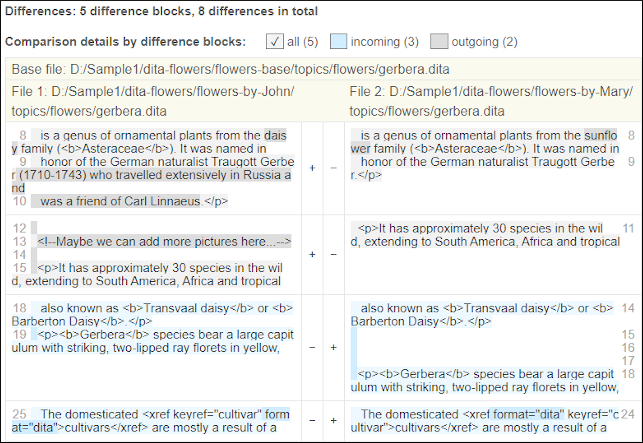
- Example 4: Compare Files by Getting Arguments from a Configuration File
- The arguments are read from the config.xml file, including the mandatory
file path arguments. However, the values that correspond to the arguments
with the IDs -out and -outfile are overwritten by the yaml and
anotherResults.yaml values provided on the command line (even if specified in
the config.xml
file).
sh scripts/compareFiles.sh -argsFile config.xml -out yaml -outfile anotherResults.yaml
Resources
For more information about the file comparison script and how to
generate comparison reports in various formats, see the following resources: