
Advanced Search
How to use advanced query syntax to build more precise searches across task files.
Along with simple searches, the Content Fusion search engine also supports
advanced query syntax that allows you to create more complex, flexible, and useful queries to
make the search more precise. This topic describes the advanced search features that you can
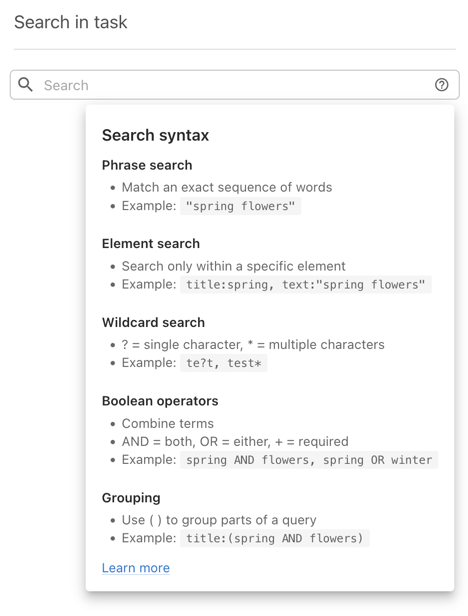
use when searching. A short reference is also available in the UI via the help icon ( ) next to the search field.
Phrase Search
A query consists of terms and operators. Terms can be either single terms (individual words) or phrases (multiple words surrounded by quotes).
When you enclose words in double quotation marks, the search returns results only when the exact phrase appears in the content.
Example - Search for the exact phrase:
"Install Content Fusion"Element Search
You can search within a specific XML element by specifying the element name followed by a
colon (:) and the search term.
Example - Search for the phrase The Right Way occurrences inside a
title element:
title:"The Right Way"title:Do it righttitle element for Do and search for it
and right anywhere in the document. For DITA, some useful elements to use are: title,
shortdesc, codeblock, filepath,
keyword.
Wildcard Search
You can use wildcard characters in individual terms to broaden a search. Wildcards are not supported within quoted phrases.
? - Matches a single character.
* - Matches zero or more characters.
Example - Find terms like meet or meat:
me?tExample - Find terms like test, tests,
testing:
test** or ?. Regular Expression Search
You can use regular expressions to match patterns. A regular expression should be enclosed
in forward slashes (/.../).
Example - Match boat or moat:
/[mb]oat/Proximity Search
To find terms that occur within a defined number of words from each other, append a tilde
(~) and a number after a quoted phrase.
Example - Find instances where dita and webhelp occur
within 10 words of each other:
"dita webhelp"~10Boosting
You can increase the relative importance of a term by adding a caret (^)
with a numeric boost factor after the term.
Example - Increase the relevance of documents that contain
dita:
dita^4 webhelpBoolean Operators
Boolean operators combine terms logically. The supported operators are AND, OR, +, NOT, and -. Operators must be in ALL CAPS.
When no operator is specified between terms, OR is assumed.
Example - Find documents that contain either term:
"dita webhelp" ditaAND - Documents must contain both terms:
"dita webhelp" AND "content search"+ - Term is required:
+dita webhelpNOT - Exclude documents with the following term:
"dita webhelp" NOT "content search"- - Another way to exclude results:
"dita webhelp" -"content search"Field Grouping
Use parentheses to group multiple conditions within a field.
Example - Find titles that contain both dita and
content search.
title:(+dita +"content search")Escaping Special Characters
To search for characters that are part of the query syntax (for example ( ) * ?
:), escape those characters with a backslash (\):
\(1\+1\)\:2