Unsafe Tool Auto-Approval Preferences
Tools that once executed cannot be undone or previewed by AI Positron are considered to be unsafe. Such tools include all tools obtained using the Model Context Protocol integration and tools used to run command lines. For such tools, by default, the end user is asked explicitly to allow the tool to run in the chat box. The end user can also choose when asked to always allow a tool to run, in which case the allowed tool is automatically added to the list of allowed tools in this preferences page.
The text area contains a line-separated list of tool name prefixes that are always allowed to run without asking the end user.
For a tool that runs a command line, when the end user allows a certain command line, the
prefix of the command line is also added to the tool name. Therefore, the user may always
allow a command line such as git log to run but they may want to be asked for
any other command line.
For MCP tools, each MCP tool that is run by the LLM must be allowed and approved separately. As an example, when this MCP tool call is always allowed:
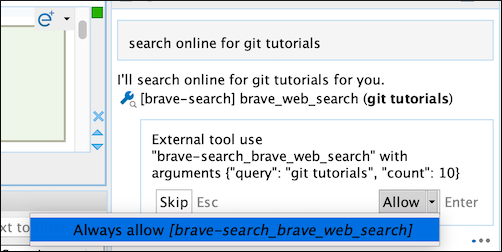
the preferences page is updated to contain this entry:
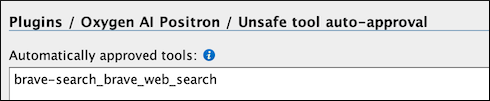
If you want to allow all tool calls to the MCP server, you can manually adjust it to contain
only the prefix brave-search_.
This preferences page can be saved at project level if you want to share a certain set of allowed tools with your team members.